We have a TracFone v176 (GSM, Motorola)and wanted to add a WinChime ringtone to the handset,preferably at no charge.
Generate a MIDI File
We know that this phone is capable of playing MIDI files directly. This can be verified by navigating on the phone to Multimedia-> Sounds->Clouds-> (Menu)-> Details-> Select, and noticing the file Type is “MIDI”.
WinChime allows us to generate a MIDI file, using the currently selected program settings for scale, wind, instrument, and so forth. Click WinChime menu File-> Save MIDI File As, enter a file name, and specify the number of notesin the file.
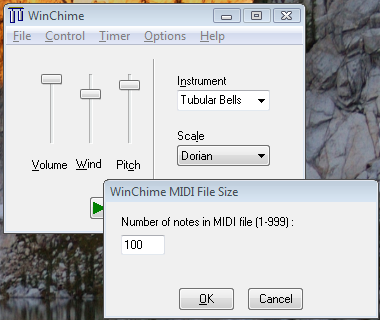
Using WinChime, we create a unique file with our chosen program settings:pitch, musical scale, and so forth. Since no copyrighted tune is used, we donot steal from creative artists.
(download)
Send MIDI File to Cell
Before sending a MIDI file to the phone as a message, we first wanted to explore the possibility of using a data cable, to avoid the minor 1-2 unit charge of receiving and downloading a message. Googling for “V176 data cable”does return some hits. (Well, to be objective, almost any cell-phone related search returns some hits.) Perhaps Motorola once manufactured a version of theV176 having a port for a data cable, but this handset purchased from TracFone certainly doesn’t have a data interface (unless it is also shared with the headset jack– doubtful) and we disassembled just to make certain:
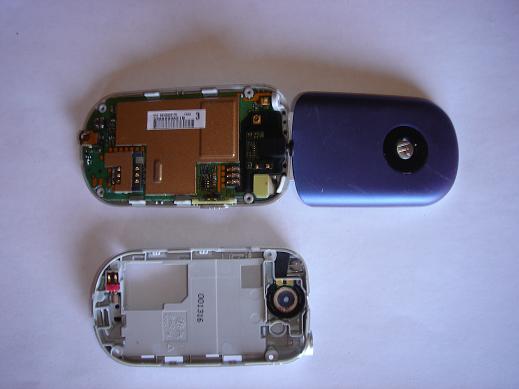
Nope, no place for a data jack, although an empty spot on the bottom of the circuit board might have had space for one in an alternate version.
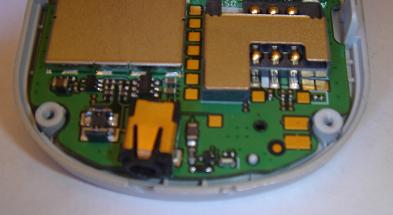
We didn’t try using a GSM SIM reader/writer, to see if we could transfermedia files to the phone using this interface. Has anyone tried this with aV176? My guess is that SMS messages might be stored on the card, but not MMS ormedia, so this probably wouldn’t work.
Send MIDI File to Cell — Try Again
This cell service provider provides a way to send MMS messages to TracFone phones from an e-mail account, addressing tocellNumber@mms.att.net . We sent a message, with a WinChime-generated MIDI file as attachment.
Save the File as RingTone
The phone received our message and could play the attached MIDI file. Click the “navigation” button, select “Save Content”, and use the file name”WinChime”.
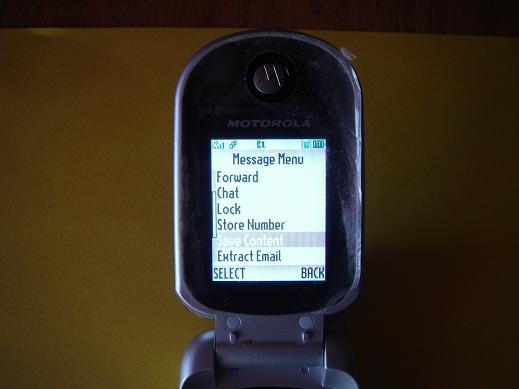
At the cell phone top level menu, press “Navigate” button->Multimedia-> Sounds-> WinChime-> “Navigate” button -> “Apply as Ring Tone”.
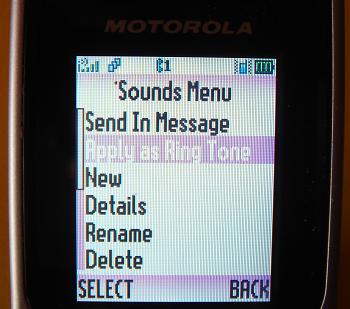
Our cell-phone now has a unique wind chime ringtone!
Next
Future articles may explore WinChime ringtones for other mobile providers and cell-phone models.
(copyright Sagebrush Systems, July 2007)